threat-tiger
Threat Tiger 🐯 — Threat Modeling With A Bite
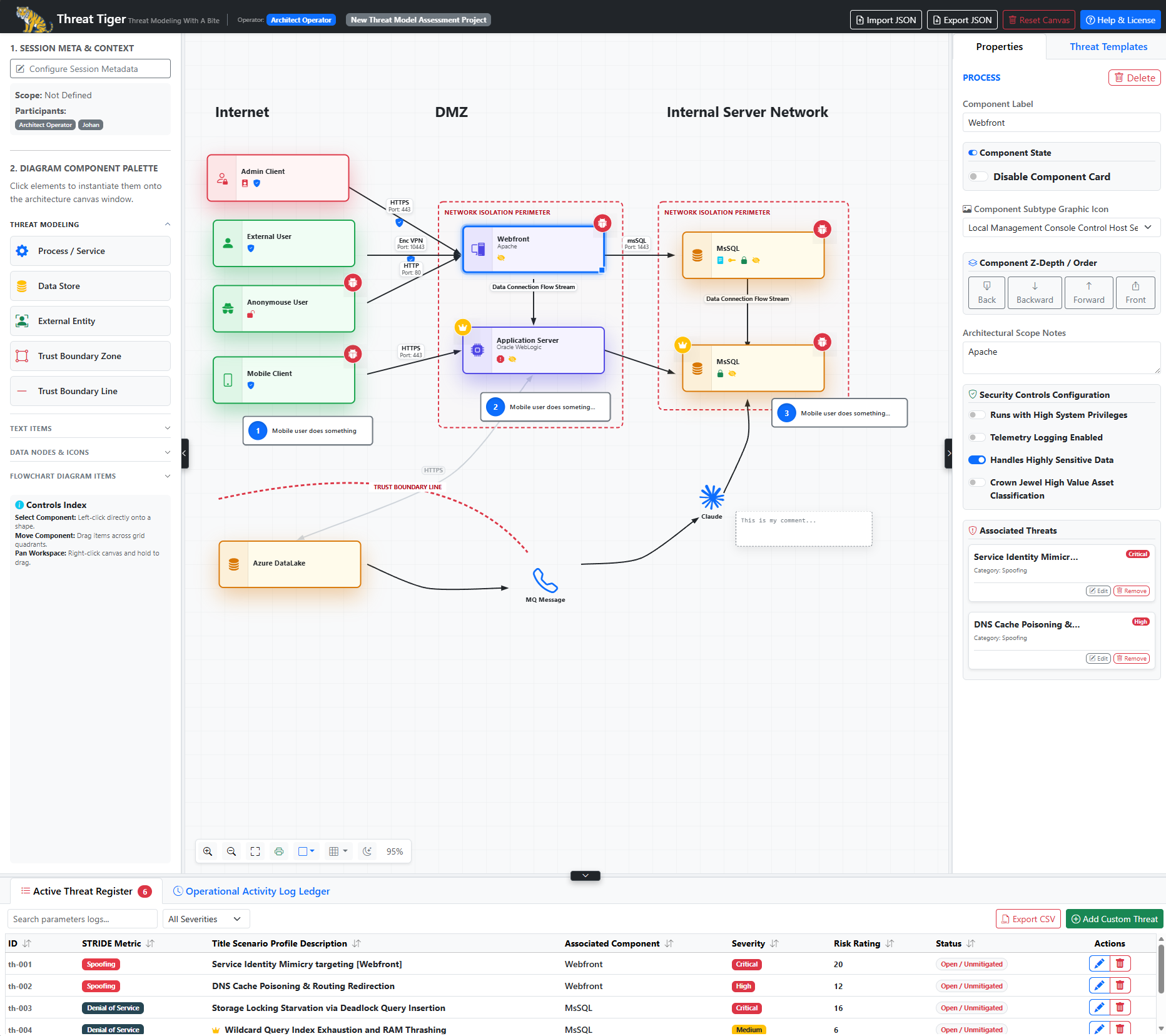
Threat Tiger is an interactive, offline-first, client-side threat modeling web application designed to help developers, software architects, and security engineers design, analyze, and secure their system architectures.
Threat Tiger is a single HTML file plus a few local assets. It needs no installation, no database and no internet connection, and it never sends your data anywhere: your architecture and threat assessments stay in your browser and in the files you export.
A demo site is available here: https://jozeta.github.io/threat-tiger/threat-tiger.html
🚀 Key Features
- Interactive architecture canvas: drag and drop processes, data stores, external entities, trust zones and trust boundary lines, infrastructure nodes, steps, text, flowchart shapes, swimlanes and your own images. More than 200 icons (servers, code, web, infrastructure, databases, security, people).
- Trust-boundary analysis: data flows that cross a trust zone or boundary line are detected live and marked on the canvas.
- Threat suggestions: a curated library of 244 concrete threats (OWASP, CWE, MITRE ATT&CK references; real-world incidents as examples; typical controls). Suggestions are ranked: triggered by your model (security switches, boundary crossings, connected flows — with the reason), relevant for this component (recognised from its icon and name, e.g. API, S3 bucket, administrator), then the rest. Every suggestion can be added (it then leaves the list), ignored, or marked not applicable with a reason, which is kept in the model and the report. The Component Label field suggests names that fit the component type. See docs/threat-templates.md.
- Threat register: likelihood × impact scoring, status and mitigation tracking, search and filters (severity, STRIDE category, status, “needs review”). Click a threat to jump to its component.
- Insights: summary tiles, open-risk heat map, STRIDE coverage per component, boundary crossings and model checks (unconnected components, duplicate names, …).
- Undo / redo, automatic History snapshots, and an activity log.
- Import / export: JSON (full, or a git-friendly variant that diffs cleanly), CSV, Markdown report (with an embedded Mermaid diagram), Mermaid diagram, PNG and a print-ready report.
- Keyboard and screen-reader friendly, works on narrow screens, light and dark canvas themes, isometric views.
🛠️ How to Get Started
- Download or clone this repository.
- Open
threat-tiger.htmlin a modern browser (Chrome, Edge, Firefox, Safari) — double-clicking the file works, everything is local. For the full experience (e.g. opening the demo model from the welcome screen) serve the folder over http, for example withnpm run serve(see below) orpython3 -m http.server. - On first visit, choose Open demo model or Start modeling. Click You: in the header to set the name used in the activity log.
- Add components from the palette, connect them with data flows, and set their security properties in Properties.
- Open Threat Templates on a selected component to add threats — suggestions triggered by your model are listed first. Use the Insights tab to see what is still missing.
All other actions (import, export, reports, History, help) are in the ☰ menu at the top right.
Keyboard
| Key | Action |
|---|---|
| Tab / Shift+Tab | Move between components and data flows on the canvas |
| Enter / Space | Select the focused item |
| Arrow keys (Shift for larger steps) | Move the selection |
| Delete / Backspace | Delete the selection (asks first if threats would be deleted) |
| Escape | Deselect |
| Ctrl/Cmd+Z, Ctrl/Cmd+Shift+Z or Ctrl+Y | Undo / redo |
| Ctrl/Cmd+C, Ctrl/Cmd+V | Copy / paste components (with the data flows between them) |
🔒 Your data
- Everything is stored only in your browser (localStorage for the current model, IndexedDB for History snapshots). Nothing is uploaded.
- Anyone with access to your browser profile can read it. Use ☰ → Clear all data in this browser… on shared machines, and keep exported files somewhere appropriate — threat models describe weaknesses of real systems.
- If you host Threat Tiger yourself, give it its own origin (domain or sub-domain). Browser storage is shared by every page on the same origin.
- When an imported model loads images from other websites, Threat Tiger asks first, because loading them tells those websites that the model was opened.
- The activity log is a convenience history, not a tamper-proof audit trail.
🐳 Docker
The image is built from the files in this folder and served by unprivileged nginx with security headers.
docker build -t threat-tiger .
docker run -d --name threat-tiger -p 8080:8080 threat-tiger
Then open http://localhost:8080/.
💻 Development
The app is threat-tiger.html (HTML, CSS and vanilla JavaScript in one file). Front-end libraries — Bootstrap 5.3.2, Bootstrap Icons 1.13.2 and Font Awesome 6.5.1 — are bundled in vendor/ (see vendor/README.md). threat_templates.json holds the threat library, including the conditions that trigger suggestions — its format and curation are described in docs/threat-templates.md.
Development tooling is optional and only needs Node.js:
npm install        # installs Playwright (dev only)
npm test           # end-to-end tests in your installed Microsoft Edge
npm run serve      # http://127.0.0.1:4173/threat-tiger.html
npm run sync       # run after editing the script or threat_templates.json
npm run sync updates the parts of threat-tiger.html that are generated: the Content-Security-Policy hash of the inline script and the embedded copy of the templates. It also verifies the vendored files against vendor/checksums.json. The tests fail if you forget to run it.
To run the tests in Chrome instead of Edge: PW_CHANNEL=chrome npm test. To test a running deployment, e.g. the Docker container: PW_BASE_URL=http://127.0.0.1:8080 npm test.
The version is APP_VERSION in threat-tiger.html (shown in Help & License and stored in exported files). Changes are listed in CHANGELOG.md.
🤝 Feedback & Support
For bug reports, feature requests, or general feedback, you can:
- Visit the project’s GitHub page: https://github.com/jozeta/threat-tiger
- Contact the developer via email: johan.zetterstrom@protonmail.com
📄 License
This project is licensed under the MIT License. See LICENSE for details. Bundled third-party assets keep their own licenses (see vendor/README.md).